
$119.95
Add to Cart
Personal Media Plex / JellySeerr Enhanced Server automates your content collection
More than 10 available
Details
Shipping: US-Mainland: $6.00 (more destinations)
Sales Tax: check
Condition: Used
Returns: does not accept (more)


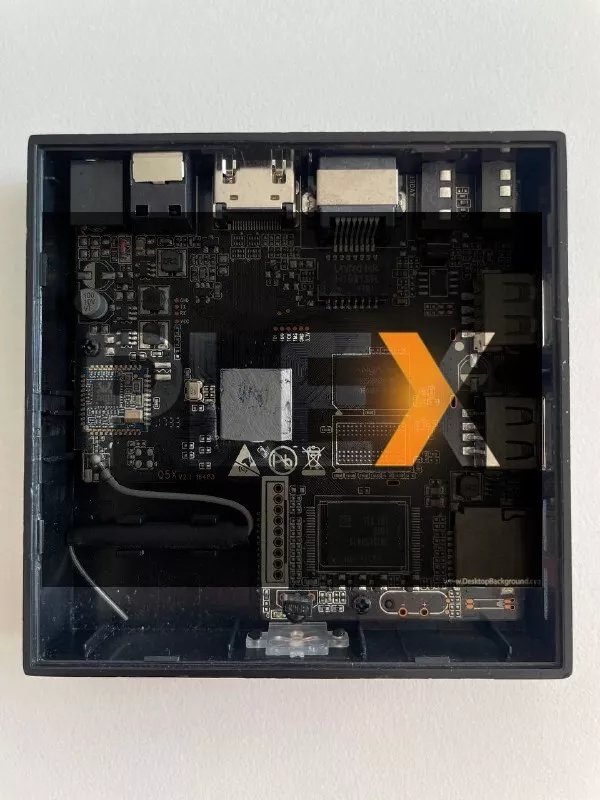
Plex Server installed on a repurposed Android TV Box with 2GB of usable memory and 32GB of EMMC storage. The box is usually setup so that the Plex server is running from the internal EMMC storage so no external media such as a micro sd or USB flash drive is needed. Note that this box will come with the software installed, but the buyer will be required to setup Plex, Jellyseerr and the other resources with their personal preferences. The box would also require external media to store any content the user has. If you are interested in an external drive being included with the box just contact me for a quote.
Note that this box is not meant to be used for resource intensive tasks, but should work just fine for a lower volume device doing a few tasks at one time.
Plex can load libraries from media attached to the box or other devises that have shares setup on the network. The only requirement is that any media that is directly attached to the box is either low power like a SSD drive or self powered like a external hard drive or some type of NAS. The box is also setup so that it should auto mount external media that are connected via USB. Transcoded audio and video can be setup on the external media, but the setup only includes the Plex server and no other related software.
Plex is one of the most important streaming services, even if it's not one of the most well-known offerings. While the best streaming services often place large libraries of shows and movies at your reach for on-demand viewing, Plex lets you become the master of your own domain.
If you have a collection of media (or know someone else with one), Plex enables you to stream all that stuff from a computer or server onto your TV. And while you can pay for Plex, a lot of its best features are actually free — as are the movies and TV shows and channels it airs. And one of its latest features makes Plex one of the best streaming apps, is actually all about working with some of the top streaming services around.
And not only are Plex apps available on the best streaming devices, but a mastery of Plex will complement the best Netflix shows and the best Hulu movies.
Whether you’re a video hoarder with hundreds of movies just begging for a media server, or a casual streamer looking for a different approach, Plex is well worth at least a few hours of your time. Read on to find out exactly what it is, and how you can make it work for you.
Plex TV explained
You can refer to Plex as a streaming service, because that is technically true. Originally, Plex was a way to utilize videos stored in a remote location, so you could streams them on a device. So, by default, Plex was a media server. This means that many see Plex as a way to provide their own content instead of relying on a big company’s library, which usually changes from month to month.
Then, Plex got more dynamic, adding an ad-supported streaming service that offers free TV and movies, and it also connects to other free streaming services.
Plex also wants to help you learn about what you're watching with Discover Credits, which looks like its own IMDb. To find it, go to the cast section of a movie or show's page, or just look at the "People" options when you search. There, you'll find a bio and social media links, that actor's most famous roles and their filmography — which will include where you can watch those shows, in both libraries and services accessible to you.
Note that this box is not meant to be used for resource intensive tasks, but should work just fine for a lower volume device doing a few tasks at one time.
Plex can load libraries from media attached to the box or other devises that have shares setup on the network. The only requirement is that any media that is directly attached to the box is either low power like a SSD drive or self powered like a external hard drive or some type of NAS. The box is also setup so that it should auto mount external media that are connected via USB. Transcoded audio and video can be setup on the external media, but the setup only includes the Plex server and no other related software.
Plex is one of the most important streaming services, even if it's not one of the most well-known offerings. While the best streaming services often place large libraries of shows and movies at your reach for on-demand viewing, Plex lets you become the master of your own domain.
If you have a collection of media (or know someone else with one), Plex enables you to stream all that stuff from a computer or server onto your TV. And while you can pay for Plex, a lot of its best features are actually free — as are the movies and TV shows and channels it airs. And one of its latest features makes Plex one of the best streaming apps, is actually all about working with some of the top streaming services around.
And not only are Plex apps available on the best streaming devices, but a mastery of Plex will complement the best Netflix shows and the best Hulu movies.
Whether you’re a video hoarder with hundreds of movies just begging for a media server, or a casual streamer looking for a different approach, Plex is well worth at least a few hours of your time. Read on to find out exactly what it is, and how you can make it work for you.
Plex TV explained
You can refer to Plex as a streaming service, because that is technically true. Originally, Plex was a way to utilize videos stored in a remote location, so you could streams them on a device. So, by default, Plex was a media server. This means that many see Plex as a way to provide their own content instead of relying on a big company’s library, which usually changes from month to month.
Then, Plex got more dynamic, adding an ad-supported streaming service that offers free TV and movies, and it also connects to other free streaming services.
Plex also wants to help you learn about what you're watching with Discover Credits, which looks like its own IMDb. To find it, go to the cast section of a movie or show's page, or just look at the "People" options when you search. There, you'll find a bio and social media links, that actor's most famous roles and their filmography — which will include where you can watch those shows, in both libraries and services accessible to you.


